The Best Freshdesk Alternative for Growing SaaS Teams (2026)

If you're looking for a Freshdesk alternative, it's usually not because Freshdesk is a bad help desk. It's one of the more affordable ones on the market, and for a lot of small teams its ticketing is exactly enough. The reason teams start looking is that they've realized "Freshdesk" by itself is the ticketing piece, and the rest of what they need (a real CRM, a way to see what a user actually did) lives in separate products they have to buy and connect.
Here's an honest take on where Freshdesk is strong, where it stops, and when a single consolidated platform beats Freshdesk plus the tools you bolt onto it.
Feature Comparison at a Glance
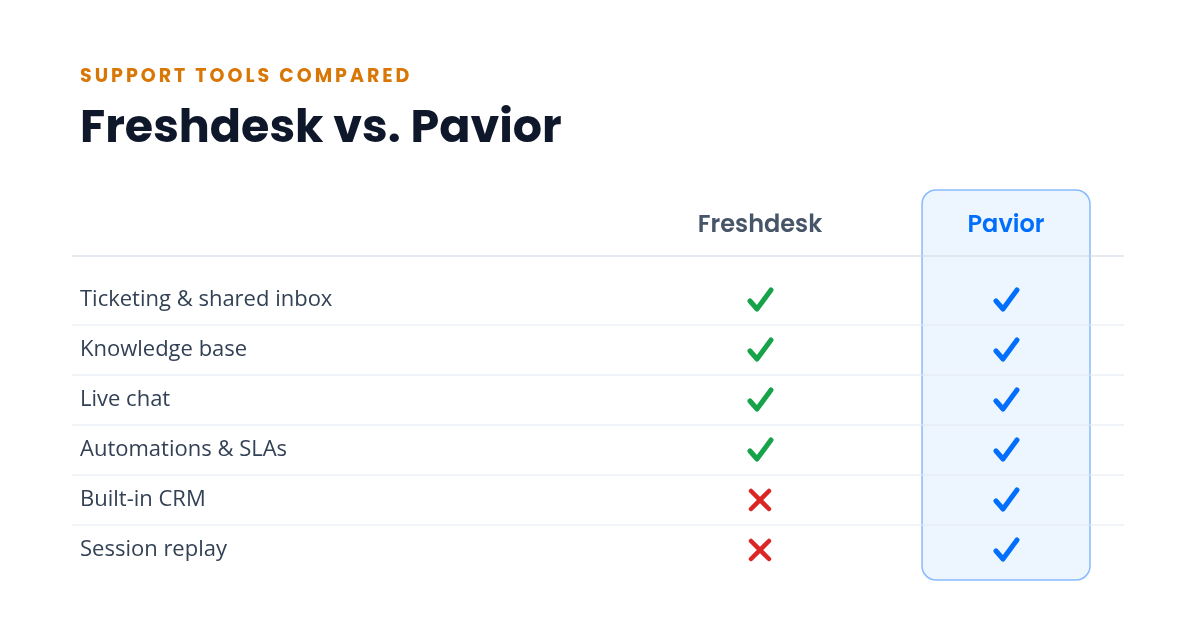
| Capability | Freshdesk | Pavior |
|---|---|---|
| Ticketing & shared inbox | ✓ Yes | ✓ Yes |
| Knowledge base | ✓ Yes | ✓ Yes |
| Live chat | ✓ Via Freshchat or Omni | ✓ Built in |
| Automations & SLAs | ✓ Yes | ✓ Yes |
| Built-in CRM | ✗ Separate (Freshsales) | ✓ Yes |
| Session replay | ✗ No | ✓ Yes |
Freshdesk covers ticketing and a knowledge base well, and you can add chat through Freshchat or step up to the Omni suite. The two gaps are a built-in CRM and session replay, and both are the kind of thing teams reach for once they grow past basic ticketing. The sections below walk through what that means in practice.
What Freshdesk Does Well
Freshdesk is a clean, approachable help desk that has earned its popularity, especially with teams watching budget.
Where it shines:
- Solid ticketing with automations, SLAs, and a tidy agent experience
- A published knowledge base on most plans for deflecting common questions
- Paid tiers that start affordably (Growth runs $19 per agent/mo billed annually) compared with the enterprise players
- A free plan for getting started, though it now covers only 1–2 agents and runs about six months before it requires a paid plan
For a team whose main need is well-organized email ticketing without a big bill, Freshdesk is a reasonable, low-risk pick.
Where Freshdesk Stops
The limits are structural rather than about quality.
- No built-in CRM. Managing customers as records, building segments, and running sales-style workflows requires Freshsales, a separate Freshworks product to license and sync. Freshdesk on its own gives you tickets, not a CRM.
- No session replay. When a customer reports a bug, Freshdesk can't show you what they did. You need to add a third-party tool and switch between products to follow one problem.
- The full picture is several products. Chat is Freshchat, CRM is Freshsales, and the bundled Omni suite (which folds chat into ticketing) starts higher at $29 per agent/mo and still leaves out CRM and session replay. A team that wants ticketing, chat, and a CRM is buying and connecting more than one thing, even though they all come from one vendor.
None of this makes Freshdesk a bad help desk. It marks where ticketing ends and where you start assembling the rest of a support stack.
The All-in-One Approach: One Platform Instead of a Suite
The alternative to "Freshdesk plus Freshsales plus a replay tool" is a single platform that ships all of it together: shared inbox, live chat, help center, campaigns, CRM, session replay, feedback, and in-app announcements under one login.
Where it shines:
- One login, one dashboard, one bill. No syncing between products from the same vendor.
- Customer data flows between features by default. A chat enriches the CRM record, a CRM segment triggers a campaign, and a session replay sits next to the conversation it explains.
- Less to learn and set up, because it's one interface instead of several products bolted together.
Where it gets complicated:
- All-in-one platforms are newer, so the third-party ecosystem is smaller than Freshworks'.
- A single feature may not match the depth of a dedicated tool. If you need the most advanced ticketing automation on the market, a specialist might edge it out.
- You're consolidating on one vendor.
How to Decide
Stay with Freshdesk if:
- Your main need is affordable, well-organized email ticketing
- You're fine running a CRM and session replay as separate tools, or you don't need them yet
- Your team and volume keep you on the lower paid tiers
Choose an all-in-one platform if:
- You want a CRM and session replay in the same place you answer tickets, not as separate Freshworks products
- You're tired of buying and wiring together multiple tools from the same vendor
- You'd rather build a help center that deflects common questions and run campaigns from the same dashboard support lives in
- You're weighing other help-desk-first tools too, like Help Scout, or the bigger players Intercom and Zendesk
The Cost Is in the Wiring
Freshdesk is affordable, so price isn't the argument. You could even pair it with free tiers of a CRM and a session-replay tool and pay very little.
What adds up instead is the wiring. Several products means several setups, several places customer data lives, and integrations you maintain so it all roughly lines up. When something breaks between them, it's a morning gone. When a customer's history is split across ticketing, a CRM, and a replay tool, no one sees the whole picture at once. That's the same tab-switching tax that quietly slows a small team down, and it never appears on an invoice.
A consolidated platform trades a little feature depth for never paying that tax. For a small team, that trade is usually worth it.
Try the All-in-One Approach
Pavior includes a shared inbox, live chat, session replay, CRM, campaigns, feedback collection, announcements, and a help center in a single dashboard. The free tier gives a two-person team every one of those features in one place, and paid plans add seats as you grow, with nothing to integrate at any size.
Try Pavior for free at pavior.com
Sources
- Freshworks: Freshdesk Pricing
- Freshworks: Freshdesk Omni Pricing