The Best Free Intercom Alternative for Small SaaS Teams (2026)

If you're looking for an Intercom alternative, you've almost certainly weighed it against Zendesk too. They're the defaults: the tools everyone's heard of, the names that come up in every "best customer support software" listicle.
If a lighter, help-desk-first tool is more your speed, it's worth weighing Help Scout and Freshdesk too, though both stop short of built-in CRM and session replay. If your team lives in email and collaboration is the whole job, Front is the shared-inbox specialist, though it lands in the same per-seat, no-free-plan bracket as Intercom. And if live chat on its own is really what you're after, we compared the best free live chat software for small teams separately.
Both are capable platforms, and both have been around long enough to earn their reputation. But "capable" and "right for your team" are different things. And in 2026, there's a third option worth considering: platforms that consolidate everything into a single tool instead of asking you to assemble a stack.
Here's an honest comparison of all three approaches.
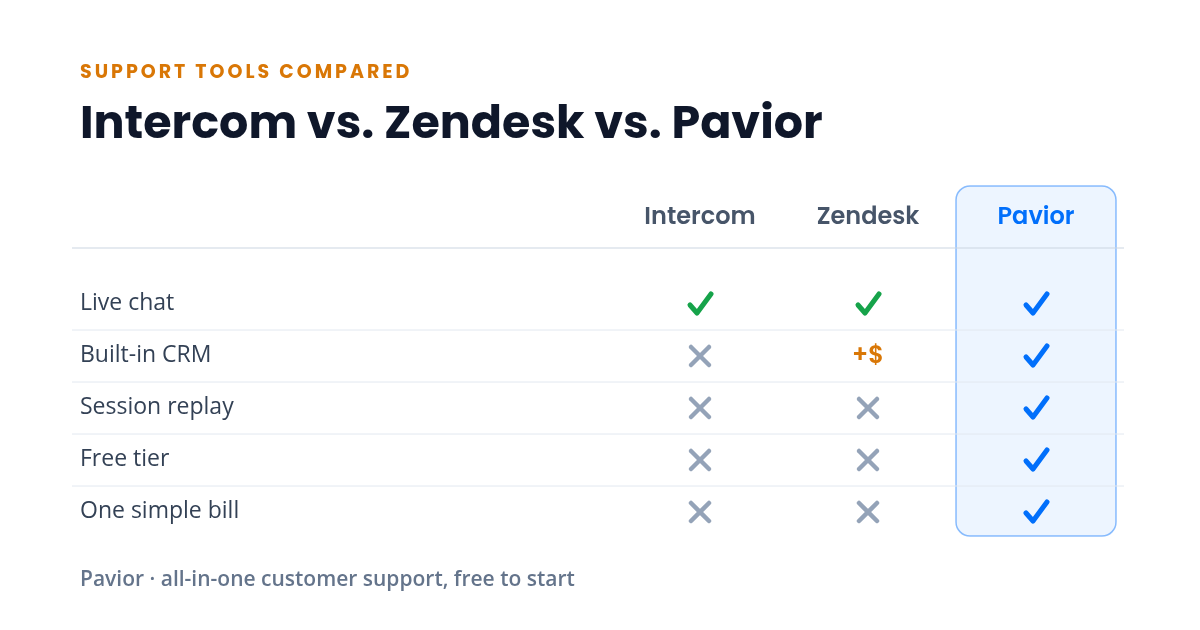
Feature Comparison at a Glance
| Feature | Intercom | Zendesk | Pavior |
|---|---|---|---|
| Live chat | ✓ Yes | ✓ Yes | ✓ Yes |
| Built-in CRM | ✗ No | Paid add-on | ✓ Yes |
| Session replay | ✗ No | ✗ No | ✓ Yes |
| Free tier | ✗ No | ✗ No | ✓ Yes |
| One simple bill | ✗ No | ✗ No | ✓ Yes |
Live chat aside, Intercom and Zendesk each cover only part of the picture: Zendesk's CRM (Zendesk Sell) is a separately priced product, and neither offers built-in session replay, a genuinely free tier, or a single consolidated bill. The sections below walk through what each approach does well and where it gets expensive.
Intercom: Powerful, But Priced for Scale
Intercom has positioned itself as the modern standard for customer messaging. The product is polished, the chat experience is smooth, and the automation is strong.
Where it shines:
- Conversational support with smart routing and automation
- Product tours and onboarding flows
- A mature ecosystem with integrations for most tools
Where it gets complicated:
- Published pricing runs from $29 per seat on the Essential plan to $132 per seat on the Expert plan, with the Fin AI agent billed separately at $0.99 per outcome. What starts at a reasonable monthly fee can balloon quickly as your team and contact list grow.
- Many features that feel essential (advanced reporting, custom bots, team inboxes) are locked behind higher tiers.
- Session replay, CRM, and email campaigns require additional tools or add-ons, meaning Intercom alone rarely covers the full picture.
For well-funded teams with dedicated support operations, Intercom is a strong choice. For smaller teams watching their budget, the math can get uncomfortable fast.
Zendesk: Battle-Tested, But Heavy
Zendesk is the enterprise workhorse. It's been around since 2007 and powers support for some of the largest companies in the world. If your support operation needs complex ticketing workflows, SLA management, and deep customization, Zendesk has the feature depth.
Where it shines:
- Ticketing and workflow automation at scale
- Deep customization for complex support operations
- A massive app marketplace for extending functionality
Where it gets complicated:
- The product has accumulated nearly two decades of features, which means the learning curve is significant. New agents need substantial training before they're productive.
- The interface can feel dated compared to newer tools, particularly on the agent side.
- The Suite bundles ticketing, help center, chat, and voice in one per-agent plan, but the CRM (Zendesk Sell) is a separate product with its own pricing, and there's no native session replay. Every agent also pays the per-seat price again.
- It's built for large support teams. If you're a team of one to five, you're paying for infrastructure you'll never use.
Zendesk is excellent at what it was built for: high-volume, complex support operations. But for lean SaaS teams, it often feels like driving a semi-truck to the grocery store. We go deeper on that trade-off in our full Zendesk alternative breakdown.
The All-in-One Approach: Less Assembly Required
The third option is a platform that ships with everything built in (live chat, CRM, help center, email campaigns, session replay, feedback collection, in-app announcements, and an installable mobile app) without requiring you to piece together separate products or manage integrations.
Where it shines:
- One login, one dashboard, one bill. No integration tax.
- Customer data flows between features automatically. A support conversation enriches the CRM record, a CRM segment can trigger a campaign, session replays are linked to chat conversations.
- Typically simpler to set up and learn, since there's one interface instead of five.
- Pricing is straightforward. You know what you're paying before you sign up, and it doesn't scale unpredictably with usage.
Where it gets complicated:
- All-in-one platforms are newer, which means smaller ecosystems and fewer third-party integrations.
- Individual features may not match the depth of a best-in-class dedicated tool. If you need Zendesk-level ticketing workflows or Intercom-level bot builders, a consolidated platform might not be there yet.
- You're betting on one vendor for your entire support stack, which requires confidence in the platform's direction and reliability.
How to Decide
The right choice depends on where your team is and where it's headed.
Choose Intercom if:
- You have budget for a premium tool and your team is large enough to justify the per-seat costs
- Conversational support and automation are your primary needs
- You're already integrated with tools that cover CRM, session replay, and campaigns
Choose Zendesk if:
- You run a high-volume support operation with complex routing, SLA requirements, and multi-channel needs
- Your team has the bandwidth to manage and customize a powerful but complex platform
- You need enterprise-grade compliance and audit features
Choose an all-in-one platform if:
- You're a small to mid-size SaaS team that needs live chat, CRM, campaigns, and a help center that deflects common questions without stitching together five tools
- You want to start with a free tier and grow into paid features as you scale
- You value simplicity and speed over maximum depth in any single feature
- You're tired of paying the integration tax
Intercom Competitors: Companies Similar to Intercom, and What Each One Is For
Search for Intercom competitors and you get a list of twenty names with no shape to it. The field sorts into four groups, and knowing which group you are shopping in narrows the choice faster than any feature table.
Full support suites. Zendesk and Freshdesk are the enterprise-shaped options. Ticketing comes first, routing and reporting run deep, and both are built for agent teams larger than most small SaaS companies will ever staff. The setup effort matches the scale.
Shared inboxes. Help Scout and Front treat support as email handled well by a team. Collaboration is the strength, the footprint is lighter than a full suite, and both are useful on day one rather than day thirty.
Chat-first tools. Crisp, Tidio and Chatra sit at the widget end of the market. They install in an afternoon. The tradeoff is scope, because a chat box leaves a CRM, a help center and session replay on your shopping list.
All-in-one platforms. This is where Pavior sits, and the pitch is narrower than it sounds: one dashboard covering the jobs the other three groups make you assemble from separate products.
Most people looking for a competitor for Intercom want the same jobs done without the seat math and the per-outcome AI fee stacked on top. Which group fits depends on how much of your stack you want to replace at once.
The Cost Comparison
Here's a realistic monthly comparison for a two-person team:
| Capability | Separate tools | All-in-one |
|---|---|---|
| Live chat | $100-200 | Included |
| CRM | $50-150 | Included |
| Help center | $90-180 | Included |
| Email campaigns | $90-300 | Included |
| Session replay | $120-240 | Included |
| Feedback | $60-150 | Included |
| Announcements | $90-180 | Included |
| Total | $600-1,400/mo | $0-99/mo |
The ranges above are indicative rather than exact, based on typical per-seat pricing at comparable tiers for a two-person team as of April 2026. The gap is significant, and it doesn't account for the time spent managing integrations between all those separate tools.
If you want the full picture on what Intercom itself costs, we broke down what Intercom costs in 2026, including the per-outcome Fin fee and the add-ons that move the floor.
Comparing the two big competitors directly? We put them side by side in Intercom vs Zendesk. If Help Scout is the other name on your list, the AI billing is where those two diverge most, and that comparison is Intercom vs Help Scout.
Weighing more than these two? See where they all land in our roundup of the best customer support software for small SaaS teams.
Cheaper Alternatives to Intercom: What You Pay at Each Team Size
Most people searching for a cheaper alternative to Intercom want one number: what the bill comes to. So here is the arithmetic, using Intercom's cheapest published tier.
Intercom prices per seat, so every person you add costs the same again. Pavior prices per plan with a seat cap, so you pay one flat fee until you outgrow the tier. That structural difference is what opens the gap, and it widens as the team grows.
| Team size | Intercom Essential (billed annually) | Pavior |
|---|---|---|
| 2 seats | $58/mo | $0 (basic: 2 seats, 100 conversations/mo) |
| 4 seats | $116/mo | $25/mo (economy: 4 seats) |
| 5 seats | $145/mo | $99/mo (premium: up to 10 seats) |
| 10 seats | $290/mo | $99/mo (premium: up to 10 seats) |
Three honest notes on that table.
The $29 per seat is Intercom's annual billing rate on Essential, its entry-level plan. Pay month to month, or step up to Advanced or Expert, and the number climbs. We used the cheapest rate Intercom publishes rather than the one that flatters the comparison.
The fifth seat is where Pavior's own pricing has a cliff. Economy caps at four, so a five-person team pays the same $99 as a ten-person team. If you are exactly five people, you are buying headroom you will not use for a while, and it is the one team size where the gap narrows rather than widens.
The table counts seats only. Intercom's Fin AI agent is billed on top at $0.99 per outcome, and add-ons like Copilot and Proactive Support Plus are separate again. Those are optional, so they stay out of the arithmetic, but they are the reason an Intercom invoice often lands well above the seat math.
Cheap alternatives to Intercom are easy to find. The harder question is what you give up for the lower bill, because most budget options are single-purpose chat widgets, and you end up buying a CRM, a help center, and session replay separately. That is the stack cost in the table above.
Try the All-in-One Approach
Pavior includes live chat, session replay, CRM, campaigns, feedback collection, announcements, a help center, and an installable mobile app, all in a single dashboard. The free tier gives a two-person team every feature to get started, and paid plans add seats as you grow.
Try Pavior for free at pavior.com
Sources
- Intercom: Intercom Pricing