The Best Help Scout Alternative for Growing SaaS Teams (2026)

If you're looking for a Help Scout alternative, it's usually not because Help Scout is bad. It's one of the better-designed help desks on the market, and for a lot of small teams it's exactly the right tool. The reason to look elsewhere is almost always that you've outgrown what a help desk does, and you're starting to assemble a stack around it.
Here's an honest take on where Help Scout is strong, where it stops, and when a consolidated platform makes more sense than Help Scout plus a handful of bolted-on tools.
Feature Comparison at a Glance
| Capability | Help Scout | Pavior |
|---|---|---|
| Shared inbox & email | ✓ Yes | ✓ Yes |
| Live chat | ✓ Yes | ✓ Yes |
| Knowledge base | ✓ Yes | ✓ Yes |
| Proactive messages | ✓ Yes | ✓ Yes |
| Built-in CRM | ✗ Profiles only | ✓ Yes |
| Session replay | ✗ Add-on only | ✓ Yes |
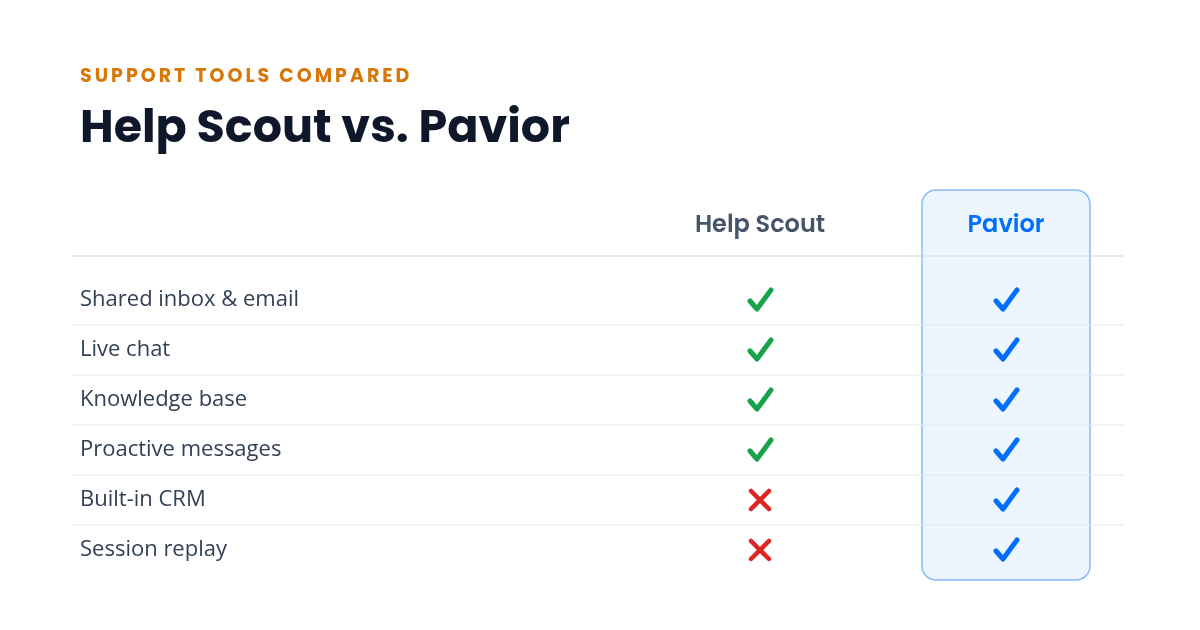
Help Scout covers the core of customer support well. The two gaps are a built-in CRM and session replay, and both are the kind of thing teams reach for once they grow past basic ticketing. The sections below walk through what that means in practice.
What Help Scout Does Well
Help Scout is built around a shared inbox, and it's very good at it. The agent experience is clean, conversations stay readable, and the whole product avoids the bloat that makes older help desks feel like work to operate.
Where it shines:
- A genuinely pleasant shared inbox with collision detection, saved replies, and workflows
- A solid knowledge base (Docs) that any plan can publish, including the free one
- Live chat and proactive Messages for reaching customers before they file a ticket
- Customer profiles that pull in context from connected apps so agents aren't hunting for it
For a team whose main job is answering email and chat well, Help Scout needs very little defending. It does that job, and it does it without much friction.
Where Help Scout Stops
The limits show up once support stops being only about replies.
- No built-in CRM. Help Scout gives you customer profiles, not a CRM. You can see who someone is and pull in context from other apps, but you can't manage customers as records, build segments, or run sales-style workflows. For that you add a separate CRM and sync it across.
- No native session replay. When a customer says "it's broken," seeing exactly what they did is the fastest way to help. Help Scout has no built-in session replay; you connect a third-party tool like LiveSession and jump between two products to follow one problem.
Neither of these makes Help Scout a bad product. They mark where a help desk ends and where you start buying and wiring up everything around it.
The All-in-One Approach: One Platform Instead of a Stack
The alternative to "Help Scout plus a CRM plus a session-replay tool" is a single platform that ships all of it together: shared inbox, live chat, help center, campaigns, CRM, session replay, feedback, and in-app announcements under one login.
Where it shines:
- One login, one dashboard, one bill. There's no integration tax and nothing to sync.
- Customer data flows between features by default. A chat enriches the CRM record, a CRM segment triggers a campaign, and a session replay sits next to the conversation it explains.
- Less to learn and set up, because it's one interface instead of three or four.
Where it gets complicated:
- All-in-one platforms are newer, so the third-party ecosystem is smaller than Help Scout's.
- Any single feature may not match the depth of a dedicated best-in-class tool. If you need the most advanced inbox automation on the market, a specialist might still edge it out.
- You're consolidating on one vendor, which means trusting that vendor's direction.
How to Decide
Stay with Help Scout if:
- Your work is mostly email and chat support, and you want the best-feeling shared inbox for it
- You don't need a real CRM or session replay yet, or you're happy running them as separate tools
- Your contact volume and team are small enough that its plans stay comfortable
Choose an all-in-one platform if:
- You want a CRM and session replay in the same place you answer tickets, not bolted on
- You're tired of paying for and maintaining the integrations between three or four tools
- You'd rather build a help center that deflects common questions and run campaigns from the same dashboard your support lives in
- You're weighing the same question against the bigger players too, and want cheap alternatives to Intercom priced out seat by seat, or the honest comparison for Zendesk specifically, or you're sizing it up against another affordable help desk like Freshdesk, or you just want a free live chat tool to start with before adding the rest
- You're also comparing Front, the other shared-inbox specialist, which collaborates beautifully and runs into the same two walls: no built-in CRM, no native session replay, and no free plan to start on
The Cost Is in the Wiring
It's tempting to compare this on price, but that's not where the difference is. Help Scout is affordable, and you could even pair its free plan with free tiers of a CRM and a session-replay tool and pay close to nothing.
What adds up instead is the wiring. Three products means three logins, three bills, and a set of integrations you maintain so customer data lands in roughly the same place. When something breaks between them, it's a morning gone. When a customer's history is split across a help desk, a CRM, and a replay tool, no one has the full picture in one view. That's the same tab-switching tax that quietly slows a small team down, and it doesn't show up on any invoice.
A consolidated platform trades a little feature depth for never paying that tax. For a small team, that trade is usually worth it.
Still shopping around? See how every option compares in our roundup of the best customer support software.
Try the All-in-One Approach
Pavior includes a shared inbox, live chat, session replay, CRM, campaigns, feedback collection, announcements, and a help center in a single dashboard. The free tier gives a two-person team every one of those features in one place, and paid plans add seats as you grow, with nothing to integrate at any size.
Try Pavior for free at pavior.com