The Best Free Intercom Alternative for Small SaaS Teams (2026)

If you're looking for an Intercom alternative, you've almost certainly weighed it against Zendesk too. They're the defaults: the tools everyone's heard of, the names that come up in every "best customer support software" listicle.
If a lighter, help-desk-first tool is more your speed, it's worth weighing Help Scout too, though it stops short of built-in CRM and session replay.
Both are capable platforms, and both have been around long enough to earn their reputation. But "capable" and "right for your team" are different things. And in 2026, there's a third option worth considering: platforms that consolidate everything into a single tool instead of asking you to assemble a stack.
Here's an honest comparison of all three approaches.
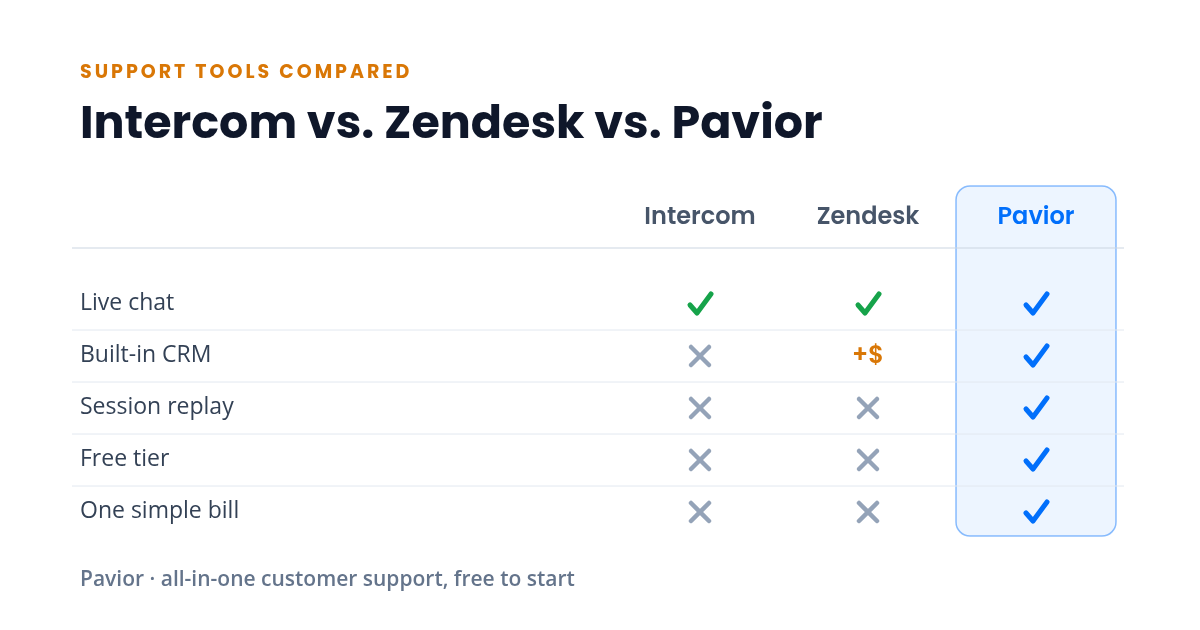
Feature Comparison at a Glance
| Feature | Intercom | Zendesk | Pavior |
|---|---|---|---|
| Live chat | ✓ Yes | ✓ Yes | ✓ Yes |
| Built-in CRM | ✗ No | Paid add-on | ✓ Yes |
| Session replay | ✗ No | ✗ No | ✓ Yes |
| Free tier | ✗ No | ✗ No | ✓ Yes |
| One simple bill | ✗ No | ✗ No | ✓ Yes |
Live chat aside, Intercom and Zendesk each cover only part of the picture: Zendesk's CRM (Zendesk Sell) is a separately priced product, and neither offers built-in session replay, a genuinely free tier, or a single consolidated bill. The sections below walk through what each approach does well and where it gets expensive.
Intercom: Powerful, But Priced for Scale
Intercom has positioned itself as the modern standard for customer messaging. The product is polished, the chat experience is smooth, and the automation is strong.
Where it shines:
- Conversational support with smart routing and automation
- Product tours and onboarding flows
- A mature ecosystem with integrations for most tools
Where it gets complicated:
- Published pricing runs from roughly $29 per seat on the Essential plan to $132 per seat on the Expert plan, with Fin AI priced per resolution on top. What starts at a reasonable monthly fee can balloon quickly as your team and contact list grow.
- Many features that feel essential (advanced reporting, custom bots, team inboxes) are locked behind higher tiers.
- Session replay, CRM, and email campaigns require additional tools or add-ons, meaning Intercom alone rarely covers the full picture.
For well-funded teams with dedicated support operations, Intercom is a strong choice. For smaller teams watching their budget, the math can get uncomfortable fast.
Zendesk: Battle-Tested, But Heavy
Zendesk is the enterprise workhorse. It's been around since 2007 and powers support for some of the largest companies in the world. If your support operation needs complex ticketing workflows, SLA management, and deep customization, Zendesk has the feature depth.
Where it shines:
- Ticketing and workflow automation at scale
- Deep customization for complex support operations
- A massive app marketplace for extending functionality
Where it gets complicated:
- The product has accumulated nearly two decades of features, which means the learning curve is significant. New agents need substantial training before they're productive.
- The interface can feel dated compared to newer tools, particularly on the agent side.
- Like Intercom, the full experience requires multiple products (Zendesk Support, Zendesk Guide, Zendesk Chat, Zendesk Sell), each with its own pricing.
- It's built for large support teams. If you're a team of one to five, you're paying for infrastructure you'll never use.
Zendesk is excellent at what it was built for: high-volume, complex support operations. But for lean SaaS teams, it often feels like driving a semi-truck to the grocery store.
The All-in-One Approach: Less Assembly Required
The third option is a platform that ships with everything built in (live chat, CRM, help center, email campaigns, session replay, feedback collection, in-app announcements, and an installable mobile app) without requiring you to piece together separate products or manage integrations.
Where it shines:
- One login, one dashboard, one bill. No integration tax.
- Customer data flows between features automatically. A support conversation enriches the CRM record, a CRM segment can trigger a campaign, session replays are linked to chat conversations.
- Typically simpler to set up and learn, since there's one interface instead of five.
- Pricing is straightforward. You know what you're paying before you sign up, and it doesn't scale unpredictably with usage.
Where it gets complicated:
- All-in-one platforms are newer, which means smaller ecosystems and fewer third-party integrations.
- Individual features may not match the depth of a best-in-class dedicated tool. If you need Zendesk-level ticketing workflows or Intercom-level bot builders, a consolidated platform might not be there yet.
- You're betting on one vendor for your entire support stack, which requires confidence in the platform's direction and reliability.
How to Decide
The right choice depends on where your team is and where it's headed.
Choose Intercom if:
- You have budget for a premium tool and your team is large enough to justify the per-seat costs
- Conversational support and automation are your primary needs
- You're already integrated with tools that cover CRM, session replay, and campaigns
Choose Zendesk if:
- You run a high-volume support operation with complex routing, SLA requirements, and multi-channel needs
- Your team has the bandwidth to manage and customize a powerful but complex platform
- You need enterprise-grade compliance and audit features
Choose an all-in-one platform if:
- You're a small to mid-size SaaS team that needs live chat, CRM, campaigns, and a help center that deflects common questions without stitching together five tools
- You want to start with a free tier and grow into paid features as you scale
- You value simplicity and speed over maximum depth in any single feature
- You're tired of paying the integration tax
The Cost Comparison
Here's a realistic monthly comparison for a two-person team:
| Capability | Separate tools | All-in-one |
|---|---|---|
| Live chat | $100-200 | Included |
| CRM | $50-150 | Included |
| Help center | $90-180 | Included |
| Email campaigns | $90-300 | Included |
| Session replay | $120-240 | Included |
| Feedback | $60-150 | Included |
| Announcements | $90-180 | Included |
| Total | $600-1,400/mo | $0-99/mo |
The ranges above are indicative rather than exact, based on typical per-seat pricing at comparable tiers for a two-person team as of April 2026. The gap is significant, and it doesn't account for the time spent managing integrations between all those separate tools.
Try the All-in-One Approach
Pavior includes live chat, session replay, CRM, campaigns, feedback collection, announcements, a help center, and an installable mobile app, all in a single dashboard. The free tier covers everything you need to get started, with no per-seat surprises.
Try Pavior for free at pavior.com
Sources
- Intercom: Intercom Pricing