The Best Free Live Chat Software for Small SaaS Teams (2026)

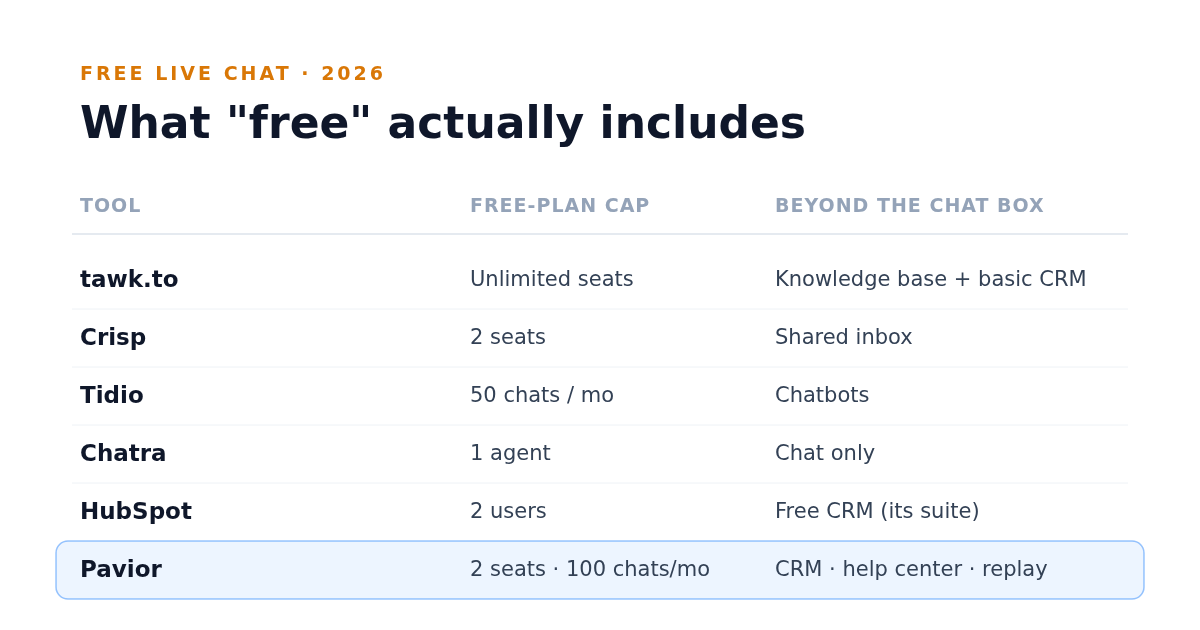
Live chat is one of the highest-leverage things a small SaaS team can add. Published benchmarks put a good first-response time on chat at under a minute, and a visitor who can ask a question the moment they're confused is a visitor who doesn't quietly leave.
The good news is you don't need a budget to start. Several tools offer a genuinely free live chat plan, not just a trial. The catch is that "free" means different things from tool to tool: different seat caps, different branding, and a big difference in what you get beyond the chat box itself. Here's an honest look at the best free options for a small team in 2026, and how to think about the trade-offs.
What "Free" Actually Means in Live Chat
Before the list, three things separate a useful free plan from a frustrating one:
- Seat caps. Some free plans cover unlimited agents, others stop at one or two. For a small team this is often the first wall you hit.
- Branding. Many free plans put the vendor's "powered by" badge on your widget. Whether that matters depends on how polished you need to look.
- What's behind the chat. A chat box is the easy part. The real question is whether the tool gives you anything else (a help center, customer history, automation) or whether chat is all it does and everything else is a separate purchase.
That last point is where most of the long-term cost hides, and it's worth weighing now rather than after you've trained your team on a tool that only does one thing.
The Best Free Live Chat Tools
tawk.to
The most genuinely free option, and not freemium: free forever with no seat limit, so you can add your whole team at no cost. The free tier covers live chat, a ticketing inbox, a hosted knowledge base, and a basic CRM. Tawk.to makes its money on the extras instead, mainly removing the "powered by" branding for a fee and renting trained chat agents. If you want a no-cost widget and don't mind the badge, nothing beats it on price. The catch is that it's lighter and less polished than the paid tools, and you're largely on your own to set it up.
Crisp
A polished, modern widget with a free plan that covers two seats and reaches a little beyond chat, with a shared inbox and mobile apps included. It's a good fit for a two-person team that wants something better-looking than tawk.to without paying yet. The jump to paid is steep, though: the first tier (Mini) is $45/mo, and the deeper features sit on Essentials at $95/mo.
Tidio
Strong on chat plus chatbots, with a free plan that's generous on seats (up to 10) but capped at 50 conversations a month that need a human reply. That conversation cap, not the seat count, is the wall most teams hit first. Good if automated flows matter to you early; just watch that monthly limit. Paid starts at about $24/mo for 100 conversations.
Chatra
A simple, friendly free plan limited to one agent, focused on doing chat well without much overhead: an online and offline widget, unlimited websites, and full conversation history. A natural fit for a solo founder. Paid plans (from ~$25/agent/mo) add seats and the deeper features.
HubSpot Live Chat
A free live chat widget that comes bundled with HubSpot's free CRM tools, so chats attach to contact records automatically. The free tier covers two users and up to 1,000 contacts, and the widget carries HubSpot branding unless you move to a paid Sales Hub plan (from $20/seat/mo). Worth a look if you're already in or considering the HubSpot ecosystem, with the usual caveat that the real value, and the upsell, is the wider suite.
Pavior
Live chat is included on Pavior's free tier, but the chat box itself isn't the differentiator. The free plan also brings a CRM, a help center, session replay, campaigns, and feedback into the same dashboard, so the customer you're chatting with already has a record, and a replay of what they did is one click away. It's capped for small teams at two seats and 100 conversations a month on the free plan, the same shape of limit the other tools here carry. The appeal is starting with chat and not having to bolt on more tools as you grow. The trade-off is the one every younger all-in-one carries: a smaller third-party ecosystem and less depth in any single feature than a dedicated specialist.
How to Choose
For most small SaaS teams it comes down to one question: do you want the cheapest standalone chat box, or the chat that grows with you?
- If you need a free widget today and nothing else, tawk.to or Chatra get you live in an afternoon.
- If chatbots and automation matter early, look at Tidio.
- If you'd rather not buy a CRM, a help center, and a replay tool separately six months from now, a consolidated platform where chat is one feature among many is worth weighing. That's the same all-in-one-versus-a-stack trade-off behind choosing an Intercom or Zendesk alternative.
The cheapest tool today and the cheapest tool over a year aren't always the same one. A free chat box that forces five separate purchases as you grow can cost more than a free plan that already includes them. Pick for where you're going, not just where you are.
Comparing the bigger platforms too? See where each lands in our roundup of the best customer support software for small SaaS teams.
Start Free
Pavior includes live chat on its free tier, alongside a CRM, help center, session replay, campaigns, and feedback in one dashboard, so chat is a starting point rather than a silo.