The Best Customer Support Software for Small SaaS Teams (2026)

Every "best customer support software" list reads about the same: the same ten logos, a feature grid, and a verdict that happens to favor whoever wrote it. This one is narrower on purpose. It's for a small SaaS team, usually two to ten people, that needs to answer customers well without buying an enterprise support operation or wiring together five tools to do it.
The honest answer is that the right tool depends on what you actually need beyond a shared inbox, and how much of your stack you want to run in one place. The sections below are a fair look at the main options in 2026. Each section covers what the tool does well and where it stops being the right fit for a small team, with a realistic price.
What to Weigh Before You Pick
Before the list, four things separate a tool that fits a small team from one that fights it:
- Free plan vs. trial. Several tools advertise "free" and mean a 14-day trial. A genuine free plan you can grow on is a different thing, and only some of these have one.
- Per-seat vs. flat pricing. Per-agent pricing is fine at two seats and punishing at ten. Watch how the bill scales, not just the entry price.
- What lives beyond the inbox. Ticketing is the easy part. The real question is whether the tool also gives you a CRM, a help center, and a way to see what a customer actually did, or whether each of those is a separate purchase.
- How many tools you want to run. Every separate product is another login, another bill, and another integration to maintain. That cost never shows up on a pricing page.
Comparison at a Glance
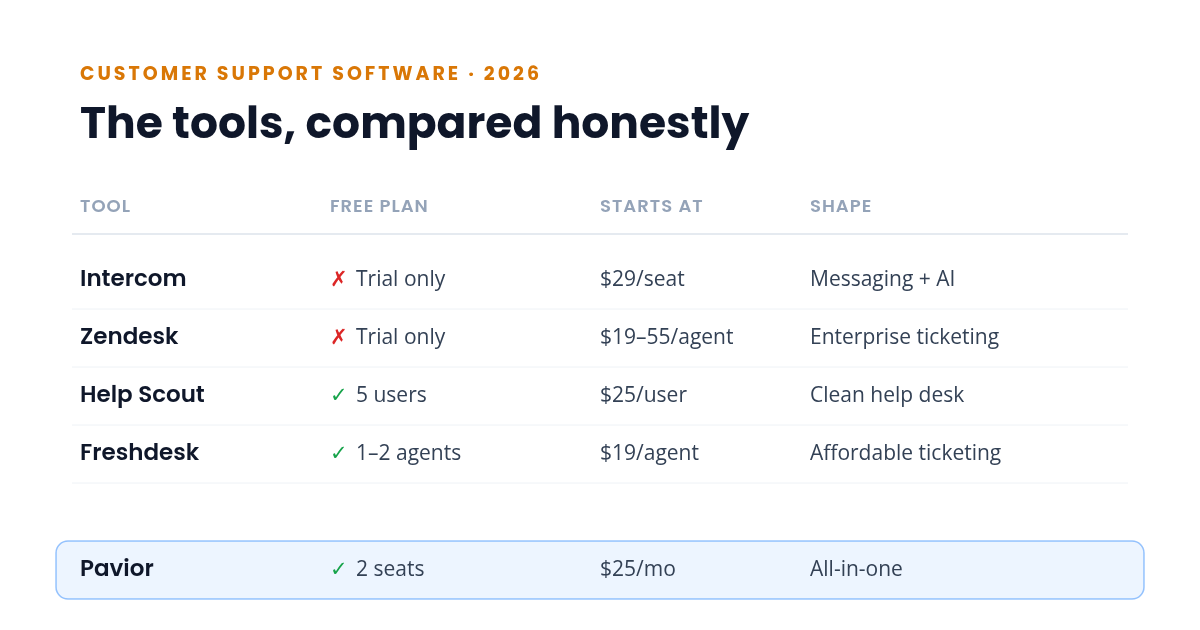
| Tool | Free plan | Starts at (paid) | Shape |
|---|---|---|---|
| Intercom | ✗ Trial only | $29/seat/mo | Premium messaging + AI |
| Zendesk | ✗ Trial only | $19–55/agent/mo | Enterprise ticketing |
| Help Scout | ✓ 5 users, 100 contacts/mo | $25/user/mo | Clean, focused help desk |
| Freshdesk | ✓ 1–2 agents, ~6 months | $19/agent/mo | Affordable ticketing |
| Front | ✗ Trial only | $19/seat/mo | Shared inbox + collaboration |
| Pavior | ✓ 2 seats, 100 conversations/mo | $25/mo (4 seats) | All-in-one |
Prices are per the vendors' own pages as of July 2026 and reflect annual billing where offered. The sections below walk through what each one is genuinely good at.
Intercom: Premium Messaging and AI
Intercom is the polished end of the market. The chat experience is smooth, the automation is strong, and Fin, its AI agent, is one of the better ones you can buy. If conversational support and onboarding flows are the center of your product experience, it earns its reputation.
The catch is price and scope. Seats run $29 on Essential to $132 on Expert per month, with Fin billed at $0.99 per outcome on top, and there's no free plan, only a 14-day trial. CRM, session replay, and campaigns still live in separate tools. It fits well-funded teams; for a lean one, the math gets uncomfortable fast. If that's your situation, our guide to the best free Intercom alternative for small SaaS teams walks through the cheaper options in detail. We went deeper on this in a breakdown of Intercom's 2026 pricing.
Zendesk: Enterprise Ticketing at Scale
Zendesk is the enterprise workhorse. It has been building support software since 2007, and for high-volume operations very little matches its depth: ticketing and routing that hold up under real load, SLA management, deep customization, and a marketplace of over 1,500 integrations.
That depth is also the problem for a small team. The Suite runs $55 to $115 per agent per month billed annually (a lighter Support-only plan starts at $19), every seat pays again, and the CRM (Sell) is a separate product. There's no free plan, and the learning curve is real. It's a lot of platform for a two-person team, as we cover in our Zendesk alternative breakdown.
Help Scout: The Best-Feeling Help Desk
Help Scout is one of the best-designed help desks you can buy. The shared inbox is clean, collision detection and saved replies just work, and the knowledge base ships on every plan, including the free one. For a team whose main job is answering email and chat well, it needs very little defending.
Its limits are structural rather than about quality. There's no built-in CRM, only lightweight profiles, and no native session replay, so those get bolted on as separate tools. Its free plan is genuine but capped (5 users, 100 contacts a month), and paid plans start at $25 per user. If a clean help desk is most of what you need, it's a strong pick, and we compare it in full in our Help Scout alternative post.
Freshdesk: Affordable, Approachable Ticketing
Freshdesk is the value option among the established players. Ticketing is clean, automations and SLAs are solid, a knowledge base ships on most plans, and paid tiers start at $19 per agent. There's a free plan too, though it now covers only 1–2 agents and runs about six months before it needs a paid plan.
The gaps are the same shape as Help Scout's: no built-in CRM (that's Freshsales, a separate Freshworks product), and no native session replay. Live chat is Freshchat or the pricier Omni suite rather than part of standard Freshdesk. For budget-conscious email ticketing it's a reasonable, low-risk pick, and our Freshdesk alternative breakdown covers where it stops.
Front: A Shared Inbox Built for Collaboration
Front is the shared-inbox specialist, and team collaboration is where it shines. Comments, assignments, and shared drafts sit right beside the customer conversation, so several people can work one inbox without colliding or falling back on forwarded email. It also ships native live chat and a knowledge base, so it covers more of the front line than a pure help desk does.
The limits are cost and scope. There's no free plan, only a 14-day trial, and seats run from $19 on the single-channel Starter plan to $49 on Professional for omnichannel, billed annually, with Enterprise higher. There's no built-in CRM (it syncs Salesforce or HubSpot instead) and no native session replay, so both stay separate purchases. If email and collaboration are the whole job it's excellent, and our Front alternative breakdown covers where it fits and where it stops.
The All-in-One Option: One Platform Instead of a Stack
The other approach in 2026 is to stop assembling a stack and run one platform that ships it all together. Pavior includes a shared inbox, live chat, help center, CRM, session replay, email campaigns, feedback, and in-app announcements under one login, with a free tier that gives a two-person team every one of those features and paid plans that add seats as you grow.
The appeal is in how the pieces connect. Customer data flows between features by default: a chat enriches the CRM record, a segment triggers a campaign, and a session replay sits next to the conversation it explains, with no integration to maintain. The trade-off is the one every younger all-in-one carries: a smaller third-party ecosystem, and less depth in any single feature than a dedicated best-in-class tool. For a small team tired of paying the tab-switching tax that comes with running five separate tools, that trade is usually worth it.
How to Choose
Match the tool to where your team actually is:
- You live in chat and have the budget: Intercom, for the messaging and AI experience, or the free Intercom alternatives if the price doesn't fit.
- You run high-volume, complex support: Zendesk, for the ticketing depth and scale.
- You want the cleanest help desk and mostly do email and chat: Help Scout.
- You want solid ticketing on a tight budget: Freshdesk.
- You live in a shared inbox and collaboration is the whole job: Front, the best team inbox in the category, or the Front alternatives if the per-seat cost is the sticking point.
- You want chat, CRM, help center, and session replay in one place instead of four: an all-in-one like Pavior, especially if you'd rather build a help center that deflects tickets from the same dashboard your support lives in.
If live chat specifically is the piece you care most about, we compared the genuinely free live chat tools separately.
The cheapest tool today and the cheapest tool over a year aren't always the same one. A help desk that forces four more purchases as you grow can cost more than a platform that already includes them. Pick for where you're headed, not only where you are.
Try the All-in-One Approach
Pavior brings a shared inbox, live chat, session replay, CRM, campaigns, feedback, and a help center into a single dashboard. The free tier gives a two-person team every one of those features in one place, and paid plans add seats as you grow.
Try Pavior for free at pavior.com
Sources
- Intercom: Pricing
- Zendesk: Pricing
- Help Scout: Pricing
- Freshworks: Freshdesk Pricing
- Front: Pricing